
When someone on your team triggers an SOS, the emergency response center contacts the emergency contacts listed for that device and starts coordinating help. Those contacts need to be correct before an emergency happens, so it is worth a few minutes to get the file right.
Before you start, have these ready:
- Your Hub admin login for www.everywhere-hub.com
- The name of the team folder you want to update
- Your emergency contact details, gathered in one place and double-checked
- Excel or another program that can save a file as a CSV
Step 1: Fill out the Bulk Upload form
- Download the Bulk Upload Form.
- Enter one row for each contact, using the column headings already in the form.
- Save the finished file as a CSV. In Excel, choose File, then Save As, then pick CSV as the file type.
Tip: Do not rename, delete, or move the column headings. The Hub reads the file by those headings, so changing them is the most common reason an upload fails.
Step 2: Log in to the Everywhere Hub.
- Go to www.everywhere-hub.com and sign in using your username and password.
Step 3: Navigate to the Devices Page
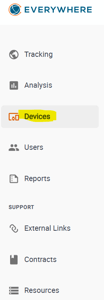
-
Select the team folder you need to update.
Step 3: Navigate to the "Emergency Management"
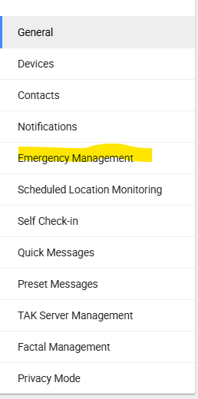
- Open Emergency Management for the team you selected.
- Under Batch Filing, click Select File.
- Choose your completed CSV file from your computer
- Read through the preview. Check names, phone numbers, and email addresses for a few rows.
- If everything looks right, confirm the import and click Finish
Note: If the preview looks wrong, do not confirm it. Close it, fix your CSV, and upload it again.
Check your work
- Open a few devices on the team and confirm their emergency contacts show up the way you expect.
- Ask each contact to confirm their phone number and email are current.
- Update the contacts any time your team changes, and review them on a regular schedule.
If something goes wrong
- You can't find Emergency Management. Make sure you selected a team folder first, and that your Hub login has admin access.
- The file won't upload. Confirm it is saved as a CSV and not as an Excel workbook.
- The preview is empty or scrambled. Check that the column headings match the form and that no rows are blank.
Still stuck? Use Contact Support at the top of this page and attach your CSV file so we can look at it with you.