
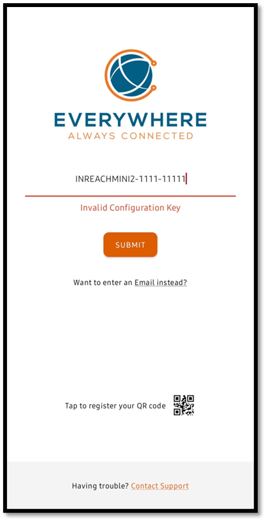
What “Invalid Configuration Key” means
A Configuration Key can only be registered to one smart device (like one phone or one tablet) at a time. This is important because location data needs to be tied to only one device for reliability.
So when you see “Invalid Configuration Key”, it usually means:
-
This key is already registered on a different device, or
-
The key is still active on a teammate’s phone, or
-
A previous user never released the key.
-
Things to watch out for:
- Did you recently change phones, get a replacement phone, or was your phone was wiped? If so you may need to release the key from that app by Resetting the Everywhere Communications App (see instructions below)
- Make sure you are using the correct Configuration Key - note that the key is case-sensitive; ensure there are no leading or trailing spaces and be careful not to confuse the digit '0' with the letter 'O'
Troubleshooting:
Are you the only person who uses this key?
You will usually see this if you registered the app before, but you are now on a different phone or if someone else on your team is using the same key.
Common reasons:
-
Your work phone was wiped (factory reset).
-
You registered the app on a phone you no longer use.
-
A team is attempting to share a device or it was recently transferred to you
What to do:
-
Try to find the phone that was previously using this key.
-
If you still have that phone and can open the app, follow the steps in “If a teammate still has the key active” below to reset the app.
-
If you do not have access to the old phone, contact your EVERYWHERE Hub administrator or fill out this form to get a new Configuration Key
NOTE: If you are an Everywhere Communications Hub User, follow this article to release/retrieve a configuration key: https://info.everywherecomms.com/knowledge/release-key-hub
"Can I use the same Configuration Key on two phones?"
No. A Configuration Key can only be registered to one smart device at a time.
If the App is still active on a another phone (this can happen if if there is no inReach involved - like when using the standalone app) follow the below instructions:
What to do:
-
Contact the teammate who may still have the key active.
-
Ask them to open the app on their phone.
-
Have them Reset the App. To do this tap Settings > App Reset when they are done using the app. (see steps below)
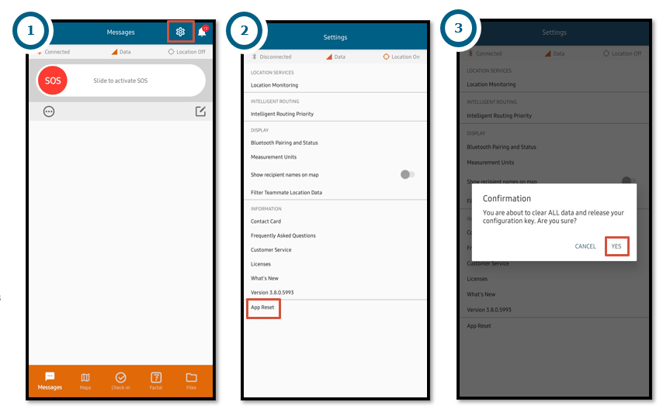
"I typed the key correctly. Why is it still invalid?"
Most of the time, the key is not wrong. It is just already registered to another device.
What to do:
-
Use the steps above to have the other device reset the app, or ask your admin to release the key.
- Make sure you are using the correct Configuration Key - note that the key is case-sensitive; ensure there are no leading or trailing spaces and be careful not to confuse the digit '0' with the letter 'O'
“I got a new phone. What should I do next time?"
Before you switch phones (if possible):
-
Reset the app on the old phone so the key is released.